How to set fixed password Teamviewer
On Teamviewer users can create passwords but only in random form and provided by the software itself. Then Teamviewer will provide a password to connect the 2 computers together. In case you want to always use 1 password, you can set a fixed password on Teamviewer.
This fixed password will always be used when you want to connect to other computers, without using random passwords. However, users need to pay attention if you connect with trusted partners, you should set a fixed password for Teamviewer.
Instructions to set a fixed password on Teamviewer
Step 1:
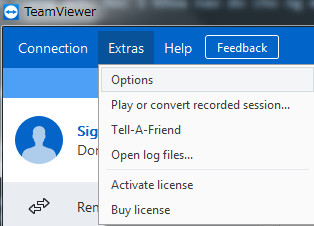
At the interface on Teamviewer, click on the Extras item above and then select Options.
Step 2:
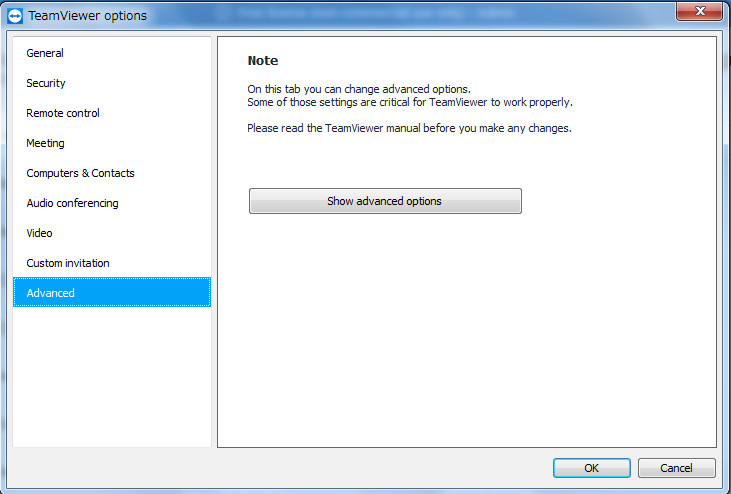
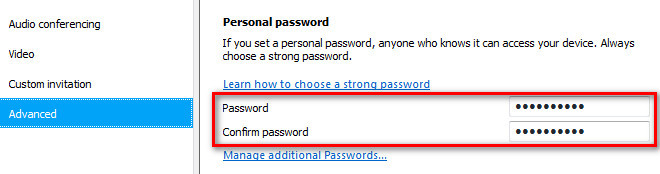
A new window opens, select Advanced -> Show advanced options -> Set Personal password : Enter the password you want to set for Teamviewer. Click OK to save the password.
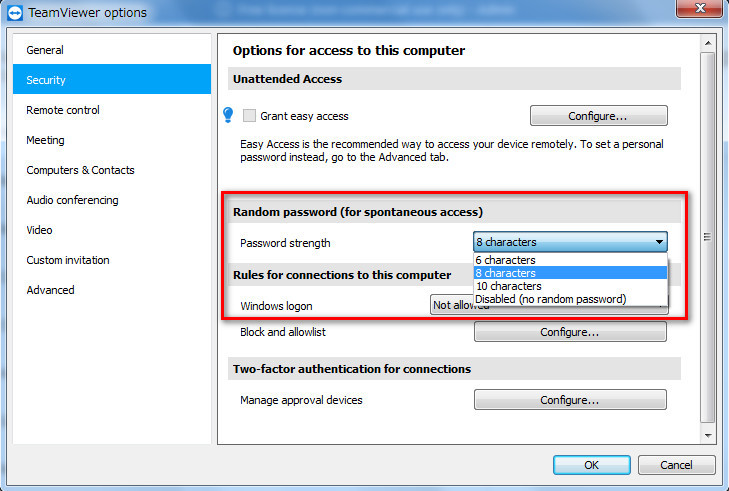
In addition, in the Security option, the Random password section, the user can also adjust the password length from 6, 8, 10 characters. Disabled to disable the password when connecting.
Setting a fixed password on Teamviewer will help users access quickly, by pressing the set ID and password. However, this method is only recommended when you connect to a really trusted computer, due to the security of personal computer data.


Nice article and explanation Keep continuing to write an article like this you may also check my website Crack Softwares Download We established Allywebsite in order to Create Long-Term Relationships with Our Community & Inspire Happiness and Positivity we been around since 2015 helping our people get more knowledge in building website so welcome aboard the ship.
ReplyDeleteMarvelous Designer Crack
TunesKit Audio Converter Crack
Cockos REAPER crack
Ashampoo Antivirus crack
I Heart NY Crack
Bandicut Crack
FxSound Enhancer Premium crack
EaseUS Todo Backup crack
TeamViewer crack